One contact, many roles
Someone can be a client, member, and volunteer simultaneously. Unified profiles with complete interaction history, vulnerable client flags, and field-level security.
The problem
Someone participates in your youth program, becomes a member, then volunteers at events. In most systems, they're three separate records—or you're forced to pick one "primary" relationship and lose visibility of the others.
Fragmented data
Client database, membership spreadsheet, volunteer roster, donor list—all separate. No one has the complete picture.
Missing context
Staff don't know this person is also a client with vulnerability flags. Communications go out that shouldn't. Risk increases.
No security controls
Anyone with access sees everything—including sensitive health info, financial hardship details, or vulnerability indicators.
The Client & Case Management module uses a unified contact model: one profile, multiple roles, granular security, and complete audit trails.
The stakeholder model
One profile at the centre. Many possible relationships.
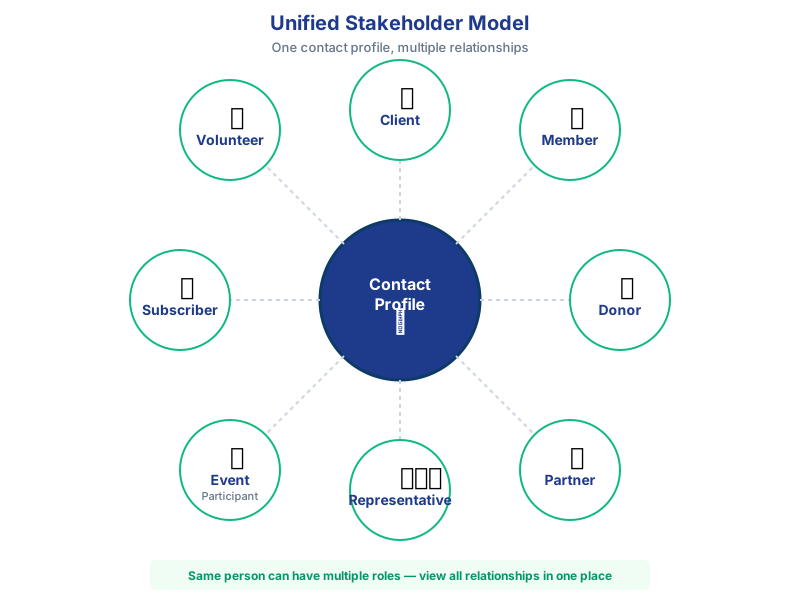
Each contact can have any combination of these roles. Permissions control who sees what based on the relationship type and data sensitivity.
Sensitive data protection
Not everyone should see everything. Security is built into the data model.
Record-level permissions
Control who can view, edit, or delete specific client records based on team membership, role, or business unit.
Field-level security
Hide sensitive fields (health data, financial hardship, vulnerability flags) from users who don't have clearance. Only authorised staff see these fields.
Audit trail
Track who viewed, created, or modified any record. See field-level change history with timestamps and user details.
Consent tracking
Record communication preferences, data sharing consent, and privacy acknowledgments. Changes logged automatically.
Scenarios: how it works in practice
Community services client
Situation: A person contacts a financial counselling service for support with debt. They're experiencing family violence and have been referred by a partner organisation.
What the system captures:
- Contact details and preferred contact method
- Referral source (partner organisation)
- Vulnerability flag: family violence indicator (field-level security applied)
- Case notes from initial assessment
- Consent for data sharing with referrer
- All subsequent interactions: calls, emails, appointments
Security: Only case workers in the Family Violence Response team can see the vulnerability flag. Finance team sees contact details and case summary, but not sensitive personal circumstances.
Outcome: Staff have context without over-sharing. The client receives appropriate support. Audit trail proves privacy compliance.
Membership stakeholder (multi-role)
Situation: A person joins as a member, attends events, donates occasionally, and volunteers at the annual conference. They're one person, but have four relationship types.
What the system shows:
- Single contact profile with all four roles visible
- Membership history: join date, renewals, tier level
- Event attendance history across all events
- Donation history with gift acknowledgment records
- Volunteer hours and roles at events
- Complete email communication history
Benefit: When this person contacts you, staff immediately see the full relationship. No more "Are you in our system?" questions. No duplicate profiles.
Engagement: Communications team can segment by role (e.g., send volunteer callouts only to active volunteers, not all members).
What you'll see in a demo
-
Unified contact profile
See how one person appears with multiple roles (client, member, volunteer) in a single profile with full interaction timeline. -
Field-level security in action
Watch how sensitive fields (vulnerability flags, health data) are hidden from unauthorised users but visible to approved case workers. -
Audit trail walkthrough
See who accessed or modified a record, when, and what fields changed—critical for compliance and accountability.
Typical configurations we see
- Multi-role contacts: One person record with relationship types: client, member, volunteer, donor, board member
- Vulnerability flags: Field-level security on mental health status, family violence indicators, child protection flags—visible only to authorized teams
- Regional access controls: Case workers see only clients in their geographic region or team assignment
- Consent management: Track communication preferences, data sharing consent, and third-party disclosure permissions
- Case handover workflows: When staff leave, automated reassignment of active cases with full audit trail and handover notes
Works with these modules
Intake & Enquiries
Enquiries convert to client records. Duplicate detection prevents creating multiple profiles for the same person.
Programs & Services
Link clients to program participation, service delivery, and outcomes tracking.
Compliance & Reporting
Audit trails and access logs support privacy compliance and risk management.
Memberships & Stakeholders
Manage member renewals, events, and engagement alongside client relationships.
Frequently asked questions
Can we manage different stakeholder types in one system?
Yes. The system supports clients, members, partners, donors, representatives, event participants, subscribers, volunteers, and other stakeholder types, all within one platform with appropriate permissions.
One contact record can have multiple relationship types simultaneously. For example, someone can be both a client receiving services and a member of your organisation.
How do we protect sensitive client information?
Field-level security controls who can see specific sensitive fields like health data or financial information. Record-level permissions control access to entire profiles based on roles. All access is logged in audit trails.
For example, you can configure it so only senior case managers see vulnerability flags, while reception staff see contact details and appointment history but not case notes.
Can we track client consent and preferences?
Yes. You can record communication preferences, consent for different purposes (e.g., data sharing with funders, marketing emails, case studies), and privacy acknowledgments. Changes to consent are tracked in the audit trail with timestamps and user details.
How does the interaction history work?
All emails, calls, meetings, notes, and case activities are automatically linked to the client profile. Staff can see the complete chronological history including who was involved and when each interaction occurred.
This includes Outlook emails (if using Microsoft 365 integration), logged phone calls, meeting records, case notes, and any activities from other modules like program participation or event attendance.
What about clients who are minors or have representatives?
The system supports age fields, minor indicators, and relationship mapping. You can link a client to their parent, guardian, advocate, or authorised representative. Permissions can be configured to control who can act on behalf of someone else.
Can we see who accessed a client record?
Yes. The audit trail shows every user who viewed, created, or modified a record, along with timestamps. This is critical for privacy compliance and responding to subject access requests under the Privacy Act.
Want to see unified stakeholder profiles in action?
Book a conversation to discuss your client management challenges, or request a walkthrough to see field-level security and audit trails.
No hard sell. Just a practical demonstration of whether this fits your needs.