Stop losing enquiries in email chaos
Centralise all inbound requests—web, email, phone, referrals—into one dashboard. Triage faster, assign clearly, respond within target times.
The problem
Enquiries arrive via web forms, emails to different staff, phone calls, and referral partners. There's no single view of what's come in, who's handling it, or whether you've responded on time.
Email silos
Enquiries sit in individual inboxes. No one else knows they exist. Staff go on leave—enquiries go unanswered.
No accountability
When everyone is responsible, no one is. You can't tell who's dealing with what, or if anyone's dealing with it at all.
Slow response times
Enquiries sit for days. By the time you respond, the client has moved on or their situation has escalated.
The Intake & Enquiries module fixes this: one dashboard for all channels, clear ownership, SLA tracking, and audit trails that prove responsiveness.
How it works
1. Capture & consolidate
Web forms
Embed intake forms on your website. Submissions auto-create enquiry records with all form data captured.
Email-to-case
Convert emails sent to a monitored inbox (e.g., intake@yourorg.org.au) into enquiries automatically.
Phone logging
Staff manually log phone enquiries. Capture caller details, issue type, and initial notes.
Referral tracking
Record referrals from partner organisations. Track referral source and follow-up status.
2. Triage & accountability
Auto-triage rules
Configure rules to assign priority, category, and team based on enquiry type, location, or keywords.
Team queues
Enquiries land in shared queues. Multiple staff can see them. Clear ownership when someone claims or is assigned.
Duplicate detection
System flags potential duplicates based on name, email, or phone. Staff link to existing records instead of creating duplicates.
Reassignment & escalation
Easily reassign enquiries if workload shifts or expertise is needed. Escalate urgent cases to managers.
3. SLA tracking & reporting
Response time targets
Set SLAs by enquiry type (e.g., urgent: 4 hours, standard: 2 business days). Track time remaining.
SLA warnings
Get notifications when an enquiry is approaching its deadline. Dashboards highlight at-risk items.
Performance dashboards
See team performance: average response time, SLA compliance rate, enquiry volume trends.
Audit trail
Full history of who did what, when. Prove responsiveness to funders or regulators.
Intake triage workflow
See how enquiries flow from capture to response
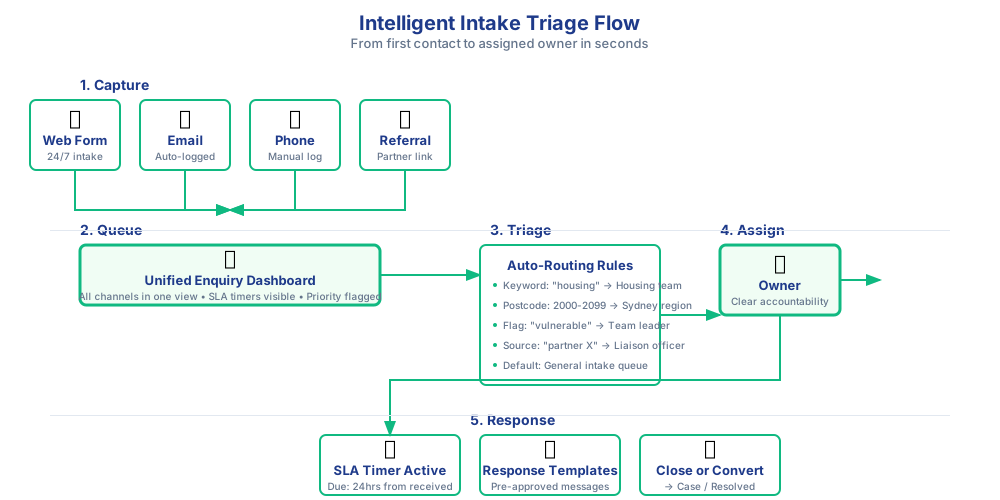
Triage rules: practical examples
Automate assignment and prioritisation based on your logic
Rule 1: Geographic assignment
IF postcode = 3000-3207 → Assign to "Melbourne Team"
IF postcode = 2000-2234 → Assign to "Sydney Team"
Rule 2: Urgent keyword detection
IF subject contains "crisis" OR "urgent" OR "immediate" → Set Priority = High
AND → Send alert to Duty Manager
Rule 3: Program-based routing
IF enquiry type = "Legal advice" → Assign to "Legal Team Queue"
IF enquiry type = "Financial counselling" → Assign to "Fin Counselling Queue"
Rule 4: Existing client fast-track
IF email matches existing contact WITH open case → Link to case owner
ELSE → Send to General Intake Queue
What you'll see in a demo
-
Live intake dashboard
See all enquiries in one view: new, assigned, overdue, resolved. Filter by team, type, or SLA status. -
Triage in action
Watch how a new enquiry auto-assigns based on rules, sets an SLA timer, and notifies the responsible team. -
Response tracking & audit trail
Follow an enquiry from submission to response. See who reviewed it, when they responded, and how it converted to a case.
Typical configurations we see
- Geographic routing: Auto-assign enquiries to regional teams based on postcode (e.g., 3000-3999 → Melbourne team)
- Urgency flags: Keywords like "crisis", "urgent", "homeless" trigger high-priority status and immediate notification
- Program-specific queues: Route enquiries to specialist teams (legal advice, financial counselling, family services)
- SLA tiering: 4-hour response for urgent, 24-hour for standard, 3-day for general information
- Email-to-case automation: Emails to info@organisation.org.au auto-create enquiry records without manual data entry
Works with these modules
Client & Case Management
Convert enquiries into formal cases when appropriate. Maintain full interaction history.
Programs & Services
Link enquiries to program interest or eligibility assessment workflows.
Communications
Send automated acknowledgment emails or SMS when enquiries are received.
AI Features
Use AI-assisted triage summaries to speed up assessment and categorisation.
Frequently asked questions
What channels can we capture enquiries from?
The intake module supports web forms, email-to-case conversion, phone call logging, and referral tracking. You can also integrate with chat systems using Microsoft Copilot.
All channels feed into the same dashboard, so you get a single view regardless of how the enquiry arrived.
How does auto-assignment work?
You configure assignment rules based on enquiry type, location, program area, or other criteria. The system automatically assigns new enquiries to the appropriate staff member or team queue based on these rules.
Rules can be simple (all legal enquiries go to the legal team) or complex (urgent housing enquiries in Melbourne go to the senior case manager if submitted after hours).
Can we set response time targets?
Yes. You can configure service level agreements (SLAs) for different enquiry types and track compliance through dashboards. The system sends reminders when targets are at risk of being missed.
SLAs can vary by priority, type, or source. For example: urgent enquiries = 4 hours, standard = 2 business days.
What happens to duplicate enquiries?
The system includes duplicate detection to identify if an enquiry relates to an existing contact or case. Staff are prompted to link to existing records rather than creating duplicates.
Duplicate detection works on name, email, phone number, and other identifying information.
Can multiple team members see the same enquiry?
Yes. Enquiries can be assigned to team queues where multiple staff have visibility. Permissions control who can view, edit, or reassign specific enquiries based on their role.
This is particularly useful for teams that work flexible rosters or need to provide coverage when specific staff are unavailable.
Can we customise the intake form fields?
Yes. Forms are fully configurable. Add custom fields, use conditional logic (show/hide fields based on answers), set required fields, and control validation.
You can have multiple intake forms for different programs or services, all feeding into the same enquiry dashboard.
Want to see the Intake & Enquiries module in action?
Book a conversation to discuss your intake challenges, or request a walkthrough to see how triage, SLA tracking, and team dashboards work.
No hard sell. Just a practical demonstration of whether this fits your needs.