Configuration-first CRM built for Australian not-for-profits
Start with what you need. Add modules as you grow. Built on Microsoft Dynamics 365—not a custom build that needs constant maintenance.
What is CRM for NFP? A Microsoft Dynamics 365-based customer relationship management system purpose-built for Australian not-for-profit organisations, providing unified intake, case management, program delivery, funder reporting, and stakeholder engagement capabilities with Australian data hosting and compliance-ready architecture.
Why this exists
Most Australian NFPs end up with one of three bad options:
Generic CRM
Built for sales teams, not case management. No risk registers. No funder reporting. No vulnerable client flags. You spend years customising it to fit NFP needs.
Custom Build
Developer builds something bespoke. It works—until the developer leaves. Then you're stuck with an unmaintainable system no one else understands.
Spreadsheets Forever
Staff maintain client lists in Excel. Case notes in Word. Funder reports manually assembled. Compliance questions take days to answer.
CRM for NFP is a fourth option: purpose-built for Australian NFPs, but built on a proven platform (Microsoft Dynamics 365) that won't disappear or need constant rewrites.
What you get
Not just software—specific outcomes that make your organisation more effective.
Faster intake response
Stop losing enquiries in email chaos. See all inbound requests in one dashboard, track SLAs, assign owners, prove you responded within target times.
Cleaner, trusted data
One client record, multiple roles (client + member + donor). No duplicate spreadsheets. Staff can trust the data because there's one source of truth.
Compliance confidence
Know who accessed what, when. Prove consent. Show risk mitigation. Answer audit questions in minutes, not days.
Board-ready reporting
Dashboards that update automatically. Evidence chains that link activities to funding deliverables. Reports your board can actually use.
Better stakeholder engagement
Track member renewals, event attendance, donation history. Send targeted communications. See engagement patterns over time.
Proof via workflows
See how the modules work together to solve real NFP challenges.
Intake triage workflow
Client submits enquiry
Rules assign priority & team
Case worker responds within SLA
Full interaction history captured
Funding reporting workflow
Deliverables & milestones defined
Sessions/cases tied to deliverables
Outcomes & participant data
Acquittal-ready data
Membership renewal workflow
Automated reminder sent
Portal shows renewal details
Secure online payment
New expiry date set
Configuration-first, not custom build
Modular architecture
You don't implement everything on day one. Start with the modules that solve your most urgent problems. Add more when ready.
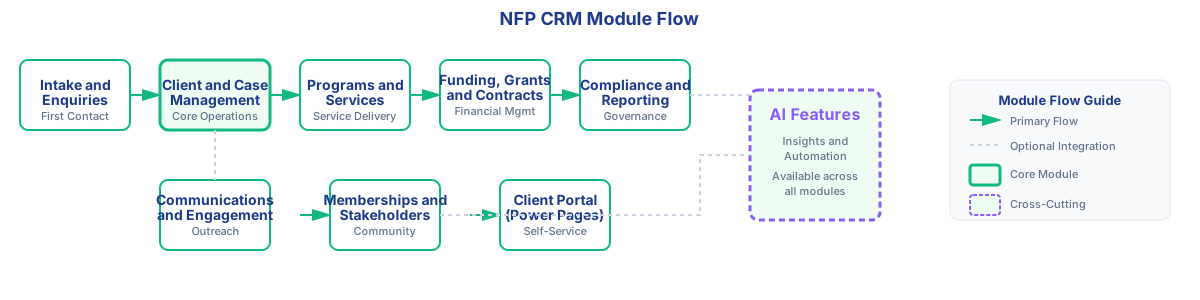
Intake & Enquiries
Multi-channel dashboard. SLA tracking. Auto-routing. Stop losing enquiries in email.
Client & Case Management
Unified profiles. Multiple roles (client, member, donor). Full interaction history.
Programs & Services
Service catalogue. Eligibility criteria. Capacity tracking. Outcomes capture.
Funding & Grants
Track funding sources. Link activities to deliverables. Evidence chain for funders.
Compliance & Reporting
Risk register. Audit trails. Board packs. Prove compliance when asked.
Communications
Email journeys. SMS. Consent management. Mailchimp replacement.
Memberships
Membership types. Renewals. Events. Payments via Stripe.
Client Portal
Self-service portal. Update details. Submit forms. Pay memberships. Power Pages.
AI Features
Triage assistance. Case note summarisation. Human-in-the-loop. Auditable.
How we fit into your technology stack
Built on the Microsoft stack you already use—not a standalone island that requires new logins and training.
Who it's for
Community Services
Client intake, case tracking, service coordination, evidence for funders, vulnerable client protections
Membership Organisations
Member database, renewals, events, communications, payment processing, engagement tracking
Peak Bodies
Multi-stakeholder coordination, advocacy campaigns, sector representation, member support
Multi-Stakeholder NFPs
Complex relationship management (clients, members, donors, partners, volunteers in one system)
Frequently asked questions
What makes CRM for NFP different from generic CRMs?
CRM for NFP is purpose-built for Australian not-for-profits with features like risk registers, vulnerable client flags, evidence chains for funders, and compliance reporting—all built into the platform, not added as expensive customisations.
Generic CRMs are designed for sales teams tracking leads and opportunities. NFPs need case management, funding accountability, stakeholder engagement, and compliance features that generic systems don't provide out of the box.
Is this built on Microsoft Dynamics 365?
Yes. We use Dynamics 365 as the foundation and configure it specifically for NFP operations. This means you get enterprise-grade security, Australian data hosting, and a platform that won't disappear or need constant rewrites.
Microsoft maintains the infrastructure, security patches, and compliance certifications. You're not dependent on a single developer or a startup that might not be around in five years.
Do I need to implement all modules at once?
No. The modular architecture means you start with what solves your most urgent problems (often Intake or Client Management), then add modules as you grow. Most organisations implement 2-3 modules in the first phase.
This phased approach spreads the cost, reduces change management risk, and lets you prove value before expanding to more areas.
Where is our data hosted?
All data is hosted in Microsoft's Australian datacentres (Sydney and Melbourne regions) for data sovereignty and compliance with Australian privacy laws.
This is particularly important for NFPs handling sensitive client data, as it ensures your data stays in Australia and meets the requirements of the Privacy Act and Australian Privacy Principles.
Can this integrate with our existing tools?
Yes. It integrates natively with Outlook, Teams, and SharePoint (if you use Microsoft 365), and can connect to accounting systems (Xero, MYOB), payment gateways (Stripe), and other tools via APIs and Power Automate.
Common integrations include: email sync, document storage, calendar sync, payment processing, accounting data, SMS providers, and survey platforms.
How long does implementation take?
A starter implementation (2-3 core modules) typically takes 4-8 weeks from discovery to go-live. Larger implementations with more modules, data migration, and custom integrations take 8-12+ weeks depending on complexity.
Timeline depends on: which modules you're implementing, how much data needs migrating, how complex your processes are, and how quickly your team can review configurations and provide feedback during the build phase.
What if we need something custom that's not in the modules?
We can add custom fields, workflows, and integrations using Dynamics 365's configuration tools and Power Automate. This keeps customisations maintainable and upgradeable, unlike fully custom builds that lock you into one vendor.
Most NFP-specific requirements (like risk registers, evidence chains, vulnerable client flags) are already built into the platform because they're common needs across the sector.
Who owns the data and the platform?
You own your data. It's hosted in your own Microsoft tenant under your organisation's control. If you ever decide to move away from our implementation, your data stays with you in the Dynamics 365 environment.
This is different from SaaS platforms where your data is locked into their proprietary database and difficult to export.
See how the modules work together
Book a walkthrough tailored to your organisation's needs. We'll show you the specific modules that solve your current challenges.
No hard sell. Just a practical demonstration of whether this fits your needs.